
Linux Agent Operations
DroidVM can perform offline maintenance operations on Linux disk images without booting the full system. It works by launching a temporary minimal VM, mounting the target disk and running a script, then automatically destroying the VM when done.
Currently the main feature provided is offline password reset.
📷 Screenshot placeholder: Agent operation progress terminal
Offline Password Reset
When you forget the password of the Linux system inside the VM, or the default password of an imported image is unknown, you can use this feature to change it directly.
Steps
- Find the target disk in the Disks tab
- Open the disk operations menu and select Reset Password
- Fill in the form:
| Field | Meaning |
|---|---|
| Disk | Target disk (shown in the title) |
| New Password | Required |
| Confirm Password | Must match the new password |
| Also reset regular user password | Toggle, off by default. When enabled, the regular user's password is changed as well |
- After confirming, DroidVM launches a temporary VM to perform the operation, with progress shown live in the terminal
- On success, a "Password changed successfully" message is shown
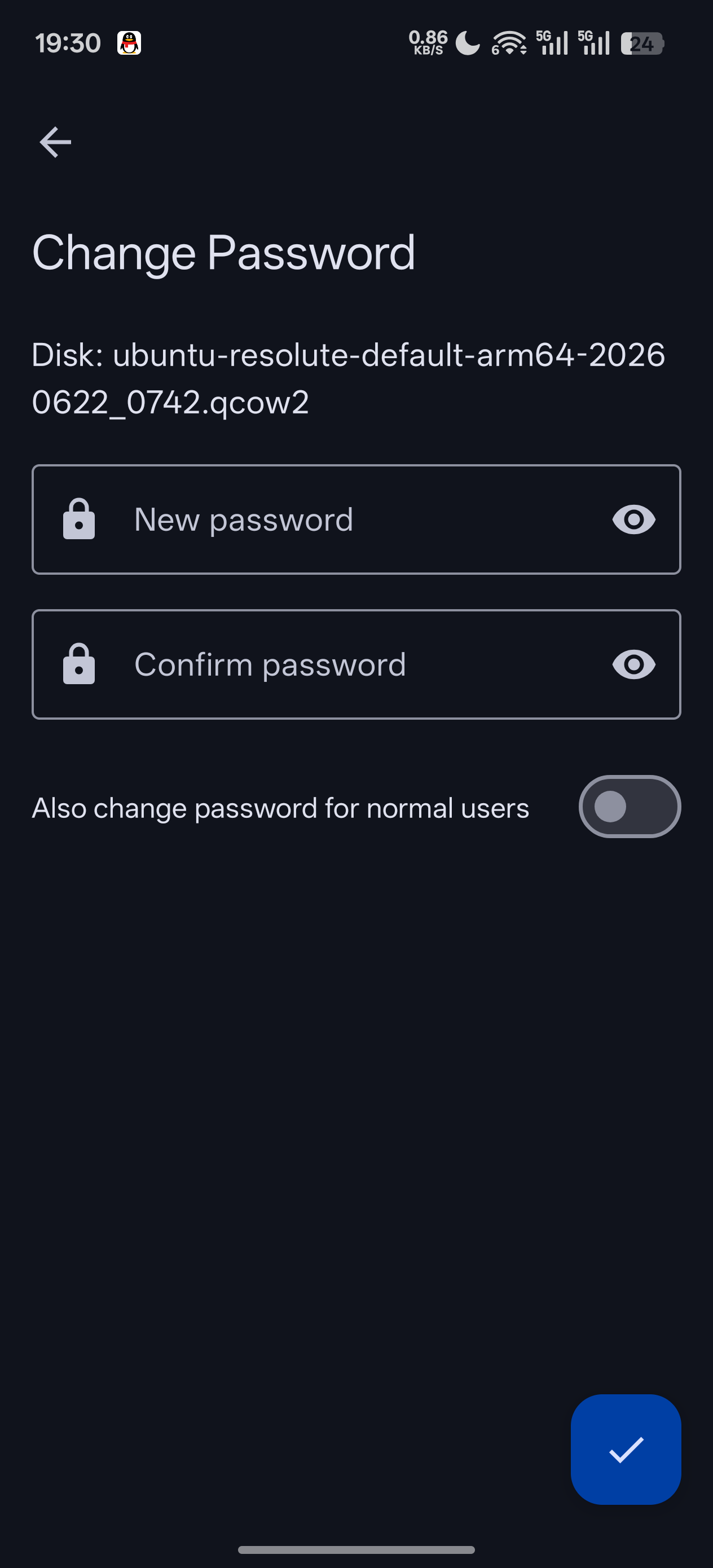
📷 Screenshot placeholder: Password reset form
Scope
This operation mounts the disk's root partition and modifies the password database within it. It applies to standard Linux filesystem images. It may not be able to handle encrypted disks or unconventional partition layouts.
Stop the VM before proceeding
Make sure the target disk is not in use by a running VM, otherwise data corruption may occur. The progress screen can be cancelled at any time; cancelling stops and deletes the temporary VM.