
Huge Pages (HugePage)
Huge Pages (2 MiB/page) reduce memory management overhead and improve VM performance. On some devices they also decide whether a VM boots at all. DroidVM reserves and manages this memory pool through the gh-hugepage-reserve kernel module.
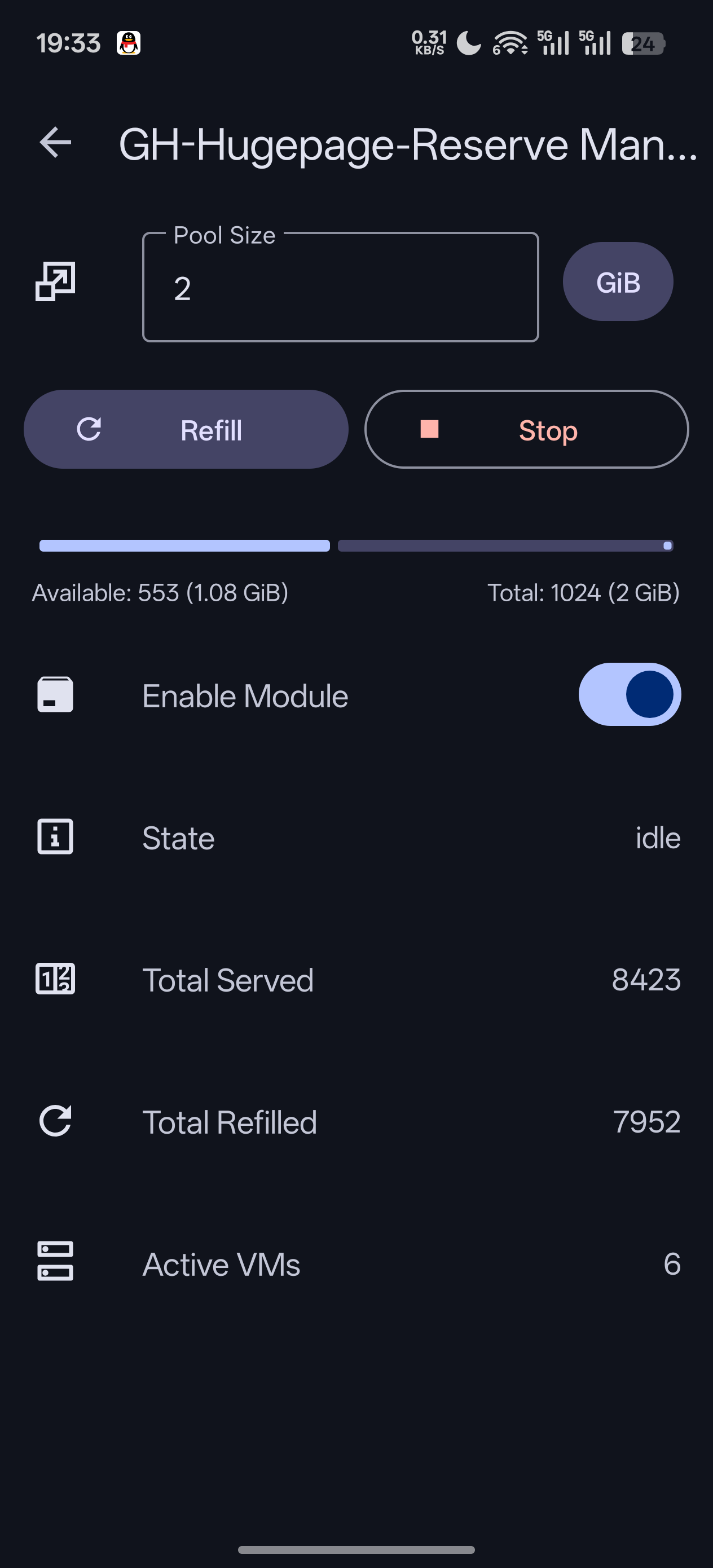
📷 Screenshot placeholder: HugePage management screen
Prerequisite: Install the Module
You need the gh-hugepage-reserve Magisk module installed first. If it isn't, a dialog appears when you open the screen — tap Download to get it from GitHub. After installing and rebooting, the feature becomes available.
Pool Size
Pool size is how much huge page memory you reserve for VMs. Enter a value and save:
- If it can take effect immediately, you'll see "saved and applied"
- Otherwise you'll see "saved (takes effect after reboot)"
Two Limits
- The pool size cannot be smaller than the total memory of running VMs
- You cannot shrink it while an acquire is in progress — wait for it to finish
Acquiring Huge Pages
📷 Screenshot placeholder: Acquire v1/v2/v3 buttons and the pool usage bar
Right after you set a pool size, the memory usually isn't actually gathered yet (the screen shows "waiting for acquire"). Acquire tells the module to assemble physical memory into contiguous huge pages. There are three modes — tap one to run it, tap again while running to stop:
| Mode | How It Works | Characteristics |
|---|---|---|
| Acquire v1 | Scans free memory directly to collect huge pages | Gentlest, but gathers the least |
| Acquire v2 | Pushes other apps to swap/zram first, then collects | More effective; affects background apps |
| Acquire v3 | Precisely picks pages and pushes them to zram block by block, then collects | Best at reaching the target |
The result tells you how much was achieved: "acquire complete" if the target was met, otherwise the actual amount versus the target.
Recommendation
Try v1 first, then v2 and v3 if it isn't enough. Pushing pages to swap/zram will get background apps killed or slowed down — that's the expected cost.
CMA (Lending Idle Memory to Apps)
Reserved huge pages sitting idle are wasted memory. With Enable CMA on, the idle portion is lent to regular apps as CMA and taken back via "acquire" when needed. Requires module v10 or newer.
When you turn it on, you may be told that this vendor kernel doesn't let apps use CMA by default. You then have two choices:
| Choice | Description |
|---|---|
| Module CMA | Only creates the reserved region without touching the kernel — no crash risk. Apps can only use it if the kernel already allows it; either way the region still serves VMs |
| Remove CMA restriction | Additionally lifts the kernel restriction so any app can use the region. May crash and reboot some devices |
How to Try "Remove Restriction" Safely
It is applied but not saved at first. If it works, choose to save it so it applies on every boot; if it crashes, just reboot and you're back to normal, because nothing was saved.
Checking Status and Usage
The screen refreshes the pool status live: module status, allocation / refill counts, active VM count, and an available / total progress bar (which distinguishes "available", "CMA", and "CMA (lent)" once CMA is on).
Tap Show usage to see exactly which processes and VMs are holding how many pages.
Other Buttons
| Button | Description |
|---|---|
| Refill | Manually trigger a pool refill |
| Enable / disable module | Whether the module loads at boot (takes effect after reboot) |
| Load / stop kernel module | Load it right now, or rmmod it directly |
| Crash warning card | Shown when the last boot crashed; tap to dismiss |
What Unloading Does
Unloading releases all reserved pages and loses per-VM usage tracking. Running VMs that use huge pages may be affected.
Enabling in a VM
Once the pool is ready, enable Huge Pages in Create/Edit VM → Basics tab and choose a pre-allocated huge page mode:
- Chunked (≤256 MiB, default): recommended, good compatibility
- Single: lends the whole block at once
- Disabled: no pre-allocation
Note
Huge pages reserve physical memory from the system, and reserving too much squeezes what's available. Remember to disable and stop the module when you're not using it to give the memory back. A few devices may hit kernel crashes because of it, so use it with care.